• Greetings, Devil Dog! Welcome to the Call of Duty Forums. It looks like you're looking forward to Call of Duty: Modern Warfare 4, but haven't created an account yet. Why not take a minute to register for your own free account now? As a member you get free access to all of our forums and posts plus the ability to post your own messages, communicate directly with other members and much more.

Benchmark

Status
Not open for further replies.
Hi guys.

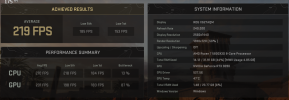
I just bought a new RTX 3080 graphics card. I put the game in ultra graphics and run a benchmark test. I get the following results:

CPU: 233 average FPS, 1% bottlenecK
GPU: 163 average FPS, 99% bottlenecK

is it normal to have 1% cpu bottleneck and 99% gpu bottleneck?

Thanks in advance
 
Hi guys.

I just bought a new RTX 3080 graphics card. I put the game in ultra graphics and run a benchmark test. I get the following results:

CPU: 233 average FPS, 1% bottlenecK
GPU: 163 average FPS, 99% bottlenecK

is it normal to have 1% cpu bottleneck and 99% gpu bottleneck?

Thanks in advance
You dont need to worry about anything!!
You want your GPU to be doing as much of the work as possible and the CPU doing the least.

You are good to go!! I have the same %'s as you and after a quick search I discovered that this is what you want to see!
 
Hi guys.

I just bought a new RTX 3080 graphics card. I put the game in ultra graphics and run a benchmark test. I get the following results:

CPU: 233 average FPS, 1% bottlenecK
GPU: 163 average FPS, 99% bottlenecK

is it normal to have 1% cpu bottleneck and 99% gpu bottleneck?

Thanks in advance
I don't understand why the game is highlighting Bottlenecks in its built in benchmarks, though I'm pleased it has included a benchmark, it can be handy for trouble shooting.

With up to 233fps in your results, it looks like you have nothing to worry about. I still haven't got the game, I'm just not getting enough time to play lately, but do feel the urge to play some CoD from time to time.

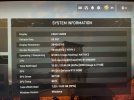
What are the rest of your system specs?
 
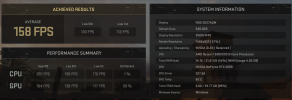
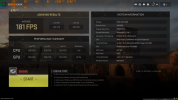
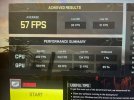
heres with higher settings. i dont understand the one with higher bottleneck.
View attachment 2339

A couple of things that I noticed that are different than mine.

  1. Try setting the display and render resolutions to the same value
  2. You could also try to adjust the Upscaling/Sharpening value to match what Im using. (Nvidia Image Scaling NATIVE)

I found a decent youtube video that helps setting up your Global and Program settings in the Nvidia control panel. If you are interested I will post up the link to it.
 
heck i dont know anymore the first one with low settings gave me better fps avg but with cpu 13% bottleneck. the second one with low settings and dlss on gave me a little less fps but 1% cpu bottleneck. im gonna go check my videos i recorded the benchmarks and i think first one i recoeded the settings. ill put a link up.
 
Status
Not open for further replies.

Like CODForums!

Advertisements

Back
Top