Greetings, Devil Dog! Welcome to the Call of Duty Forums. It looks like you're looking forward to Call of Duty: Modern Warfare 4, but haven't created an account yet. Why not take a minute to
 hi all
Earlier today I was playing the season 3 Modern Warfare taster, closed the game after a bit of a play, then after a bit went to open the game. Instead of running fine, as it had earlier, I had error messages and nothing would run. So right now, if I try to play BlackOps or Modern Warfare, I get the first message you see attached. The game then asks if I want to run in safe more or not. If I select either option, I get the 2nd message you see below.
Nothing has changed with my PC in that interval ! No driver changes, nothing. But now the game won't run at all. Please can someone advise what is happening here ? Activision support is useless, no help at all.
Regards Dave, based in UK
many thanks
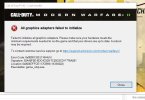
Earlier today I was playing the season 3 Modern Warfare taster, closed the game after a bit of a play, then after a bit went to open the game. Instead of running fine, as it had earlier, I had error messages and nothing would run. So right now, if I try to play BlackOps or Modern Warfare, I get the first message you see attached. The game then asks if I want to run in safe more or not. If I select either option, I get the 2nd message you see below.
Nothing has changed with my PC in that interval ! No driver changes, nothing. But now the game won't run at all. Please can someone advise what is happening here ? Activision support is useless, no help at all.
Regards Dave, based in UK
many thanks