• Greetings, Devil Dog! Welcome to the Call of Duty Forums. It looks like you're looking forward to Call of Duty: Modern Warfare 4, but haven't created an account yet. Why not take a minute to register for your own free account now? As a member you get free access to all of our forums and posts plus the ability to post your own messages, communicate directly with other members and much more.

Warzone Under The THERE'S SOMETHING YOU DON'T SEE EVERY DAY Heading...

Status
Not open for further replies.
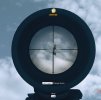
During game play.. :D It was a glitchy match all the way around for me.. I had a UAV but every time I tried to activate it I got the message that the airspace was too crowded.. But other players were launching UAVs...

Weird match all the way around...

Speaking of theater mode, I have always wanted to record my games for instances like this.. My XBOX GAME BAR doesn't work right.. I used to have a bunch of OverWolf apps installed but I think it drained too many resources.. Got a suggestion for a bare-bones recorder that won't bog down my system??

Thanx...

For the record, as near as I can tell, WARZONE doesn't have a Theater Mode.. Would be nice if it did...
 
For the record, as near as I can tell, WARZONE doesn't have a Theater Mode.. Would be nice if it did...
I don't play WZ so I wasn't sure about this.

I also thought you were playing on PC and not XBox.

There are capture devices that plug in between your console and TV then they connect to a PC/Laptop to capture the output, this reduces overhead on the console's processor to get a lag free capture of your video feed. I think Elgato produce the best of these, as a PC player, I haven't investigated using these as an option.
 
As you have an nVidia GTX 970 card (iirc) then you could use GeForce Experience to record games or set a hotkey to capture the last few minutes, this way the game is constantly recording into a buffer.

You can define how big that buffer is, so say 3-minutes, 5-minutes, 10-minutes etc... and then when you hit the hot key it will save that onto your drive and restart filling the buffer or as the buffer fills it will start overwriting content at the start, so you will always only be able to get the last x-minutes worth of recorded content, it works pretty well.

I can't see a noticeable difference between gaming with the recording on vs gaming with no recordings, it is worth experimenting with, I suspect that XBox Bar has a bigger impact on performance as some of the GeForce Experience features have been coded into the game so the game works in harmony that the nVidia drivers.
 
Status
Not open for further replies.

Like CODForums!

Advertisements

Back
Top