• Greetings, Devil Dog! Welcome to the Call of Duty Forums. It looks like you're looking forward to Call of Duty: Modern Warfare 4, but haven't created an account yet. Why not take a minute to register for your own free account now? As a member you get free access to all of our forums and posts plus the ability to post your own messages, communicate directly with other members and much more.

Benchmark

Status
Not open for further replies.
yeah id like to see it.


Nvidia control panel settings guide.


LOL, as with all things, your experience with various settings may very well differ from mine and others. In other words dont shoot the messenger. If you dont like anything after you adjust things you can always hit on the Restore to Default button in the control panel.

Yea, that's what I thought as well..
DLSS is good, Im not knocking it at all. What I noticed in your two different tests is that you were set at two different Render Resolutions. That would account for the difference in framerates.

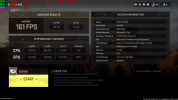
Here is mine now with DLSS enabled. I gained over 30fps while using all Ultra settings.


withdlss.png
 
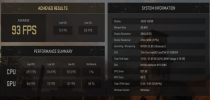
Just for curiosity I ran the benchmark program on 3 different resolutions to see the difference in framerates. The obvious conclusion is that the lower the resolution the higher the framerates......

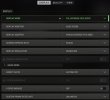
I used the settings for each of the 3 tests with these settings. The last setting "CUSTOM FRAME RATE LIMIT" is the one that is used to test "Unlimited" or "Custom". All were done with DLSS active.

graphicsettings_edited.jpg

Resolution @ 3840x2160
Custom - 91 FPS Unlimited - 91 FPS

Resolution @ 2560x1440
Custom - 128 FPS Unlimited - 129 FPS

Resolution @ 1920x1080
Custom - 149 FPS Unlimited - 150 FPS

All returned with bottleneck results of CPU 1 and GPU 99.
 
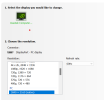
I am using an older 28inch Asus VG289 @60Hz. Ingame I usually use my max (Native) resolution of 3840x2160.

@AntiCheatAgent94 Yes, it is my understanding that the GPU should be handling the majority of the load instead of the CPU. After all, that is why they make these expensive things for us to use! LOL


nativeres.png
 
what refresh rate do you all get or use, and do you have hdr and use it. my refresh is 240 but i can overclock to 270 but i dont because i dont avg that.and have you ever used the dlr or dsr in nvidia control for resolution.
 
what refresh rate do you all get or use, and do you have hdr and use it. my refresh is 240 but i can overclock to 270 but i dont because i dont avg that.and have you ever used the dlr or dsr in nvidia control for resolution.

Where would that refresh rate setting be???

I have never really played around much with over-clocking.. I know just enough about it to be dangerous.. :D I wouldn't mind learning some ins and outs of overclocking but I have always felt it's to much work/effort for too little gain...
 
i dont overclock ever. in nvidia control panel. in manage 3d settings, its dlr and dls i think it has to do with allowing you to use higher resolution i think. look it up on youtube. i have tried it but not at present.
 
@AntiCheatAgent94 The refresh rate of your display refers to how many times per second the display is able to draw a new image. This is measured in Hertz (Hz). For example, if your display has a refresh rate of 144Hz, it is refreshing the image 144 times per second.


As for overclocking.........I just dont do it ever. It can be a minefield of disaster. One of the worst thing is that you are pushing more electricity through the very expensive parts of your system which in turn generates exponential heat. HEAT KILLS

I dont use HDR either and have not played around with the dsr settings (currently off) because I figure that it will most likely cause a FPS hit. If you are happy with the smoothness in game then why mess with it. lol
 
I have a small Discord server set up in case anyone wants to voice chat or text chat things about MW2 or more tech related issues like discussed in this thread.

Any fixes or revelations will be shared on this site if it will help others!!! I believe 100% in privacy but helpful information should be available for all to benefit from.

If you are interested at all then let me know and I will PM an invite to you.
 
Just for curiosity I ran the benchmark program on 3 different resolutions to see the difference in framerates. The obvious conclusion is that the lower the resolution the higher the framerates......

The relationship between resolution and processing workload is nothing new, higher resolutions such as 3840x2160 produce more pixels, 8,294,400 pixels in this case, compared to 2,073,600 pixels at 1920x1080. That means your PC needs to work at least 4 times harder to render the same scene at 4k than at 1080p, I'm not sure if you already knew this, or if you were highlighting this in case somebody else didn't know, you did say it was an obvious conclusion.

As for DLSS/DLSS 3.0, I won't lie, I have not really used this technology, my biggest issue is that it is a proprietary solution and not open source, but I will not get bogged down on politics here. It was developed by nVidia to use on their RTX powered GPUs to significantly improve the performance of a game by reducing the workload on the GPU, so long as the game has optimizations for DLSS and it's being run on compatible hardware.

With DLSS you can reduce your actual render resolution to generate more FPS, as highlighted by @CascadiaSRL above, and then use upscaling to render each frame at a higher resolution or with DLSS 3.0 you can go the other way and render at a higher resolution then downscale to improve quality.

Where I think it would fit best for many gamers is, if you have a high refresh rate monitor and your game does not max out FPS to get to your maximum screen refresh speed, then you could use DLSS to increase FPS performance for smoother on-screen action. Alternatively, if you are producing more FPS than your monitor could handle try it the other way and increase quality to reduce your FPS to match your screen's FPS, which might make more sense in single player or campaign mode games. Though, this is just an opinion on 2 ways in which DLSS might be useful.

As for the Bottlenecks in the Benchmark, I think it was a poor choice of word to call it a Bottleneck, when each figure is clearly showing CPU and GPU Utilisation, for most of us, seeing Bottleneck just makes us think that there is a problem, when here, the results I have don't indicate that there is.

This thread has given me some things to consider, I will try testing a few things out, I might report back if I find anything that seems conclusive, but don't know when I will get the time.
 
awsome insight nice to hear from you. i think mw2 is cool because it has that benchmark and you can use the custom setting from low to high. i may even delete geforce experience because all im playing is mw2 and i cant get enough of dmz.
 
The relationship between resolution and processing workload is nothing new, higher resolutions such as 3840x2160 produce more pixels, 8,294,400 pixels in this case, compared to 2,073,600 pixels at 1920x1080. That means your PC needs to work at least 4 times harder to render the same scene at 4k than at 1080p, I'm not sure if you already knew this, or if you were highlighting this in case somebody else didn't know, you did say it was an obvious conclusion.


As for the Bottlenecks in the Benchmark, I think it was a poor choice of word to call it a Bottleneck, when each figure is clearly showing CPU and GPU Utilisation, for most of us, seeing Bottleneck just makes us think that there is a problem, when here, the results I have don't indicate that there is.

Absolutely for sure I already knew this and was, in fact, highlighting this to get that information or point out in the open.

LOL, I was meaning to make that comment of yours earlier in my posts, the one about Bottlenecks being a very very poor choice of wording!! Bottleneck is such a dirty word that does convey the impression that things are being choked out, down or whatever. Very negative to be sure. CPU and GPU UTILIZATION would be a much better fit or some similar word!

It is not easy to make any generalized recommendations when it comes to PC's and the BEST way to set things up. Nor is it easy to troubleshoot and or make an aha revelation when trouble shooting because though similar it is extremely rare that any 2 computers are identical even with very similar or exact same components. Installed software, drivers, programs running, internet connection, and so on all play a significant role in how the end result looks on your computer screen.

Thanks for your post! Very informative and appreciated!
 
i didnt know what to think because after benchmark it says bottleneck lol
This is the point that both @CascadiaSRL and I are making, but try these 2 tests and see if your 'Bottlenecks' change.

First try a benchmark with DLSS at maximum performance setting and then again at maximum quality setting.

I am not expecting to see the same percentage levels across both tests, however, maximum performance will be aiming at pushing out as many FPS as possible so it will try and work your GPU more. It will also be producing frames at a lower resolution, so your CPU usage should increase as frame render rates will be lower.

Under the quality settings, I would expect to see an increase in frame render times leading to a drop in FPS and a drop in CPU utilisation (sorry, I'm British, I spell it with an 's' not a 'z', but both are correct).

Hopefully a few of you can produce some results on these benchmarks, it would interest me to compare and contrast multiple results.
 
Status
Not open for further replies.

Like CODForums!

Advertisements

Back
Top