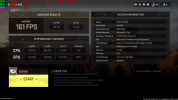
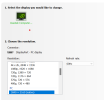
Just for curiosity I ran the benchmark program on 3 different resolutions to see the difference in framerates. The obvious conclusion is that the lower the resolution the higher the framerates......
The relationship between resolution and processing workload is nothing new, higher resolutions such as 3840x2160 produce more pixels, 8,294,400 pixels in this case, compared to 2,073,600 pixels at 1920x1080. That means your PC needs to work at least 4 times harder to render the same scene at 4k than at 1080p, I'm not sure if you already knew this, or if you were highlighting this in case somebody else didn't know, you did say it was an obvious conclusion.
As for DLSS/DLSS 3.0, I won't lie, I have not really used this technology, my biggest issue is that it is a proprietary solution and not open source, but I will not get bogged down on politics here. It was developed by nVidia to use on their RTX powered GPUs to significantly improve the performance of a game by reducing the workload on the GPU, so long as the game has optimizations for DLSS and it's being run on compatible hardware.
With DLSS you can reduce your actual render resolution to generate more FPS, as highlighted by
@CascadiaSRL above, and then use upscaling to render each frame at a higher resolution or with DLSS 3.0 you can go the other way and render at a higher resolution then downscale to improve quality.
Where I think it would fit best for many gamers is, if you have a high refresh rate monitor and your game does not max out FPS to get to your maximum screen refresh speed, then you could use DLSS to increase FPS performance for smoother on-screen action. Alternatively, if you are producing more FPS than your monitor could handle try it the other way and increase quality to reduce your FPS to match your screen's FPS, which might make more sense in single player or campaign mode games. Though, this is just an opinion on 2 ways in which DLSS might be useful.
As for the Bottlenecks in the Benchmark, I think it was a poor choice of word to call it a Bottleneck, when each figure is clearly showing CPU and GPU Utilisation, for most of us, seeing Bottleneck just makes us think that there is a problem, when here, the results I have don't indicate that there is.
This thread has given me some things to consider, I will try testing a few things out, I might report back if I find anything that seems conclusive, but don't know when I will get the time.

 Greetings, Devil Dog! Welcome to the Call of Duty Forums. It looks like you're looking forward to Call of Duty: Modern Warfare 4, but haven't created an account yet. Why not take a minute to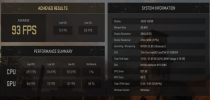



 I wouldn't mind learning some ins and outs of overclocking but I have always felt it's to much work/effort for too little gain...