• Greetings, Devil Dog! Welcome to the Call of Duty Forums. It looks like you're looking forward to Call of Duty: Modern Warfare 4, but haven't created an account yet. Why not take a minute to register for your own free account now? As a member you get free access to all of our forums and posts plus the ability to post your own messages, communicate directly with other members and much more.

resolution and refresh rate

i was in cold war and changing the dlss and i dont see anything special i mean i have good numbers but not like in that video and he,s getting a better performance % with graphics card also, compared to mine that 5600x is showing noticable difference. and for $299 us it may be worth it.
 
I'd be most interested in seeing your results should you do the upgrade.

I think now is the time to be selling you 3600 if you do go that way, or reusing it in another build, which I think is something that you said you were previously thinking about.
 
im doing upgrade best buy has them in stock so im picking up one on the way to work, and they got corsair thermal paste and evga frostbite. what do you think is good thermal. i may not put it in till my day off so i can get a good thermal off amazon if need be. and ive heard pre applied paste is ok but putting your own on will cool better so i dont know but im going to find out and if this small upgrade performs like that video i will have made to what ive been looking for.

Well I'm leaving Best buy going to work I now have the 5600x in my possession they had Corsair thermal pace which they say is very good so I'll post some videos within a few days and we'll see what it's doing
 
im doing upgrade best buy has them in stock so im picking up one on the way to work
Cool. I don't live near a place that sell components directly, I can only order for delivery, though I would prefer a Micro Center to a Best Buy, I would love to get the MC experience, I've heard so many good things about them.
what do you think is good thermal. i may not put it in till my day off so i can get a good thermal off amazon if need be. and ive heard pre applied paste is ok but putting your own on will cool better
Good thermal pastes include ProlimaTech PK-3 Nano Aluminum and Thermal Grizzly Kryonaut Paste, Thermal Grizzly has been getting a lot of mentions from prominent YouTube channels lately though I would avoid the Liquid Metal variety as it can be tricky to work with and potentially short out components if you don't have a steady hand when applying it.

As for pre-applied paste, if you are using the same cooler as before, then you should replace that paste when you take the old CPU out (don't forget to clean the heat-spreader on the old CPU before removing it from the socket or the thermal paste on it will end up getting covered in gunk).
they had Corsair thermal pace which they say is very good so I'll post some videos within a few days and we'll see what it's doing
I just checked out a few reviews of the Corsair TM30, it was good but the Noctua NT-H1 was getting better results at around the same price, and the ProlimaTech PK-3 Nano Aluminum and Thermal Grizzly Kryonaut Paste both performed at around the similar levels, they were trading places in different comparative reviews, but typically they were within 1.5 degrees centrigrade of each other, so no big difference.

I wouldn't change the TM30 for a 1.5 degree difference, if it was a bigger difference then maybe.
 
i got the xtm 50 corsair and i updated bios to version 7c02ams.3bo can you check and see if thats newest i have messaged msi support to make sure im good to go before i change it .

well its in and i do see a performance gain in gpu percentage and fps increase here is first video low settings and i will be messing with settings. but now my cpu temp wont show in afterburner and i am showing lower cpu temps in nzxt cam.

View: https://www.youtube.com/watch?v=LNcvXBguCgc
 
i got the xtm 50 corsair and i updated bios to version 7c02ams.3bo can you check and see if thats newest
The latest version of the BIOS is 7C02v3B, dated 25th May 2021, that version number looks wrong to me, take a look at the MSi website for more options, here is a link to the BIOS downloads page.

It has made a bigger difference to the frame rates than I had previously thought possible, so that's good news, the fact that your GPU utilization has gone up suggests there was some CPU bottlenecking occurring, so that's unlocked more of your GPUs potential.

I will check out the 3600 vs 5600X results later, but if you see this before I get the time, were they both shot on the same map?
 
no but i will do the same map.
That will help, when comparing results after a hardware change, it is always best to eliminate as many variables as possible. That way when you see a change in results you can be sure it is down to the components you're testing and not the different levels of graphical complexities in the maps you played on.

If you can try and match everything, even down to using the same driver version, the graphics settings, and even the room temperature can reduce the potential to contaminate your results.

This is why so many YouTube channels work with open test benches in air conditioned studios, it is just to eliminate variables such as a room temperature difference affecting the CPU cooler performance Delta.
 
first video is r5 3600 and second is r5 5600x you will see improvement in graphics card usage % and nice improvement in fps.
I watched that first video on Garrison, if you can record a round on Garrison it would be easier to see how much of a change your new CPU is making. Plus, a second-place finish, well done.

The second video was interesting too, if you look towards the water the frame rate drops to low 200's and then shoots up to 230's or higher when there is no water visible, so tessellation is having an impact on overall performance.

when i get on map to compare it to i will. can i do a custom game with bots in cod.
You could do it on a custom map, but if it is a gun game map, just play a few rounds of gun game until you get into Garrison and record it then.
but heres a video in modern warfare. i see a great inmprovement and i have accomplished what i was looking for.
It looks good, and Sawmill was a map I really enjoyed on MW, but it is hard to see how well your GPU is doing when I have no basis for comparison.
 
is there a difference between 3200 and 3600 ram. why did you choose corsair
I find conversations about RAM to be difficult because we all, myself included, use the wrong measures to describe RAM and it is an easy trap to fall into.

DDR stands for Double Data Rate, it means that for every clock cycle, 2 memory operations are completed, so essentially 2 bits of data pass when previously only 1 could, hence the double date rate name.

In your question you asked what the difference is between 3200 and 3600 ram, these numbers are describing the data transfer rate and not the speed of the RAM, which in this case would be 1600mhz or 1800mhz. Transfer speed is measured as 3200mt/s or 3600mt/s - mega transfers per second.

The Ryzen CPUs have chiplets containing cores, these cores are connected so that they can transfer data or tasks to and from each other to boost efficiency, the thing that connects them is called the infinity fabric, and this infinity fabric has its own clock speed called the FCLK or fabric clock.

For best results your RAM speed should match your FCLK speed, on your R5 3600 the default FCLK was 1600mhz, on the R5 5600X it is 1800mhz, so your ideal RAM speed is 1800mhz or 3600mt/s.

There is more to than that, such as if you're planning on overclocking, but for now this is what's important in relation to your question, as you get more confident start looking in to FCLK and how important it is to the overall performance of your PC and what happens with FCLK when you start overclocking.
 
i dont overclock i dont see the need for me anyway. but ii notice theres some ram that says it is good for ryzen cpus. i have gskill ripjaws v series 2 8 gig sticks at 3200. so was wandering if there is ram that would make a difference with cpu. i wouldnt think there would be a big difference between 3200 to 3600 and i ask because im thinking some rgb ram so ive been looking around and thanks for reply i have seen some info on fclk. hears an example it says amd ryzen series

 
why did you choose corsair
Sorry, I forgot to answer this question, so I will do that before answering the next.

I have always picked Corsair and for many years I had no issues, then when I did finally have a RAM issue I had to RMA my RAM to the Netherlands as that was the nearest RMA center in Europe. All was good for a few years, but when I had another issue with my RAM on a different system the RMA process had changed and the new location was in the UK, service was faster and quite honestly, it felt like they couldn't do enough for me. So, I pick Corsair because I am comfortable with the RMA process and customer services.

i dont overclock i dont see the need for me anyway
With the new Ryzen and even Intel platforms, they have boost features in place that reduce the need for overclocking, these will run your CPU at the fastest speed possible and are restricted only by the silicon and thermal limits of your particular CPU. I don't overclock for this reason, and in a recent video by Jayz2Cents he talks about how overclocking AMD systems had a negative impact on performance and stability.

i notice theres some ram that says it is good for ryzen cpus
If the ram is as good as they say it is it will usually be listed on the latest revision of the QVL for your mobo.

I just checked on the MSi website, on the support pages for your mobo you will find a link to check for compatibility, you can check the memory category the relates to your processor, but this only goes up to Matisse, which is fine for your R5 3600, your R5 5600X is from the Vermeer family of cores.

The next best thing to do is check on the G-Skill website to see what mobos they have tested their RAM on, you should be able to pick from this list here.

This should be easy right? If you look closely you will see that the fastest speed that G-Skill has listed is 3200, but you want to know about 3600, which we both know should work with your 5600X as the FCLK run as 1800mhz, so matching the FCLK speed with your RAM should give you the best results.

The spec sheet for the mobo shows it is compatible with:
For AMD Ryzen Gen3 (R5/R7/R9)
Supports 2667/ 2800/ 2933/ 3000/ 3066/ 3200/ 3466/ 4000/ 4133 MHz (by A-XMP OC MODE)
The list goes from 3466 to 4000, it skips 3600mt/s RAM modules.

If G-Skill list the RAM as compatible, then you should be able to RMA it and get a refund if you experience issues, I would check forums and see what you can find about people using the CPU, Mobo, and RAM configuration you have in mind before ordering so you can avoid having to waste time with an RMA in the first place.
 
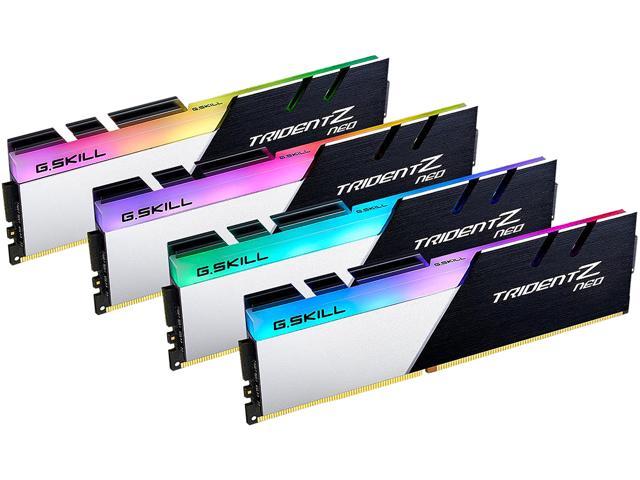
not having any issues with memory i was thinking of going rgb and when i saw memory saying for amd i started wandering if there was better ram that i could run and thinking about going 32 gig just to do it.
and if i do i dont know if i should go 4 8 gig or 2 16 gig. i have been doing alot of reading and video watching and im more confused now then when i started.
 
Check YouTube for videos on 2 sticks Vs 4 sticks of RAM.

For RGB 4 sticks looks better, but for gaming there is no big performance gain from adding an extra 16GB, you might be better off with 4 sticks of 4GB if that's even a thing now.

If I ever upgrade to 32GB it would be 4*8GB for the eye candy.

With your PC I would definitely get the 3600mt/s RAM as well, but only after checking for compatible options.
 
Check YouTube for videos on 2 sticks Vs 4 sticks of RAM.

For RGB 4 sticks looks better, but for gaming there is no big performance gain from adding an extra 16GB, you might be better off with 4 sticks of 4GB if that's even a thing now.

If I ever upgrade to 32GB it would be 4*8GB for the eye candy.

With your PC I would definitely get the 3600mt/s RAM as well, but only after checking for compatible options.
If I could just throw a recommendation here... Bitwit. BITWIT. Bitwit.

View: https://www.youtube.com/watch?v=Kjpw2eDZans
 

Like CODForums!

Advertisements

Back
Top