• Greetings, Devil Dog! Welcome to the Call of Duty Forums. It looks like you're looking forward to Call of Duty: Modern Warfare 4, but haven't created an account yet. Why not take a minute to register for your own free account now? As a member you get free access to all of our forums and posts plus the ability to post your own messages, communicate directly with other members and much more.

Warzone 2.0 FPS

Hi.
My setup is
ASUS ROG Strix B550-F GAMING
RTX 4070TI
Ryzen 7 3700x
32gb ram at 3200MHz
corsair gold 850W

Playing in 1440p i am struggeling to keep over 110fps
and even drops down to 85-90 sometimes.
i have tried diffrent settings and dosn't seem to help.
i have even tried to go from 1440p to 1080p but i dont get a single more fps? thats seems strange.
anyone who have the same issue or have a fix for this?
i know i get bottlenecked by my prossesor, but it should be that much.

 
Are you using DLSS in the settings? Are you attempting to run at ULTRA settings? Drivers? Can you post up some picks of your game video settings as well as the results of the ingame BENCHMARK program? What monitor are you using?

This is all to get started with and will be helpful in figuring out what is going on!
 
not using dlss, i have tried it, but the fps gain vs image quality isn't worth it. with dlss i get maybe +20 fps but the game looks rubbish.
not running on ultra settings, i have adjusted a lot in the settings to come to where i am now.
- i would say balanced, but if i put everything on max i drop to like steady 90-100 fps
everything on low i maybe gain like 10-15 fps.
dont have mw2 only warzone so i can't use those benchmarks

- i feel like with a 4070ti i should be able to push 150+ fps easy, i know my cpu is bottlenecking but it should be so much that i loose 100+ fps

the thing that is making me confused is that i dont get any fps benefit going from 1440p to 1080p?

nvidia drivers are up to date. maybe i should try revers back to what cod recommends?

like my hole issue with this is, i had a rtx 3060ti and same cpu and was running 130 ich fps with lower settings, after installing 4070ti i dont get any fps gain..
i can adjust the settings so i get better quality without loosing fps.. but even if i set everything on low i can't get over 125 fps
 
Do you have g-sync on? Any other games that are running at expected levels? Is GeForce being used?
 
what was it with prior graphics card. i have same motherboard with a ryzen 7 5800x3d and a 3090 ftw 3 ultra and in mw gpu is hitting in the 90 percentile. i would think that 3700x would push it just fine. what is your monitor refresh rate and is you nvidia control panel settings good with new gpu like gsync and resolution.

that 4070ti should be rocking fps
 
@freakdaddy64 that is what i think too.. 1440p 144hz is monitor.
like when i had 3060TI i was getting like 130fps with settings on low..
now i get worse fps with 4070ti . seems like something is wrong.
and the wierd part is that neither the cpu or gpu is pushing in WZ2, both are just running stable @ like 60% cpu might spike sometimes to 70% but seems like with my current setup i should have no problem capping my fps @144hz stable all game..

what fps are you getting? i know the 5800x3d is a beast but would still assume i should be getting 144hz stable.

could you take a pic or smt of your nvidia control panel settings and i can copy it and try?

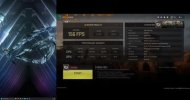
i just bought MW2 and did the Benchmark, and it says i have 158 avg fps and a 95% cpu bottleneck!
anyway to make this better?
 
i dont really mess with nvidia control panel except i make sure gsync is enabled and control panel is set to the right refresh rate for display. with settings on ultra i get 130 to 140 with settings on minimum i avg 180 to over 200 in warzone. now in mw2 i use in game benchmark and use in game custom settings and play with that looking at different fps.

try different settings in there im on 5% cpu and 95% gpu

i keep it simple if i want fps i go minimum and if i want great visual i go max settings
 
like tbh i think i just need a new cpu..
i have tried like 10 diffrent settings now, and i always end up on somewhat the same avg fps..
like i put render resu @ 130, cpu bottleneck went down but gpu went up and ended on 156 avg fps
did render res so i was rendering @ 1080p still 158 avg fps

did dlss on ultra performance got 158 avg fps
did dlss on quality with 80% sharpness and still 158 avg fps

so i have no f idea of whats happening?
seems like no matter what i do i can't get the fps up..
image quality is decreased get 158 avg fps
image quality increased get 158 avg fps

think my cpu is just to garbage?
dont know what else it could be..
 
Go in game settings set them on minimum find render resolution and lower it till like 50 and see what FPS does.

When you're in settings remember the v ram meter the lower it is the better for f p s

Have been to YouTube and search you cpu and gpu and see what they are getting
 
What monitor is it that you have. 144 is a good enough refresh rate but does it support vsync? If you are forcing it to try it could be fighting back. Check your bios info too and see if it is set properly for the highest gen for the pci-e. This makes a bit of a difference since the 4000 series of video cards is as I recall 4th gen. The slot you are using on the motherboard for the card makes a big difference too as some will restrict the card if sharing with an m2 and so on. Really check through your mobo settings to see if all is the best it can be. Rebar if available should be checked for there too.
 
It's almost kracken time I'm thirs

hope this pic looks ok, in game benchmark recommended settingsmw2benchmark.jpg

cant see crap

any it shows cpu 2% and gpu 98% recommended settings 156 fps avg
 
i have looked through bios and everything is fine there.
i have tried low settings and 50% rendering and still get 158 avg fps
i think i have come to the conclusion that my cpu just can't handle my 4070ti..
like no matter what settings i tune i dont get any more fps..
if i set settings on ultra i get lower 1% drops but still like a 150 avg fps
if i set everything on minimum i get better 1%drops but still 158 avg fps

it just seems like if i lower the settings my gpu will bottleneck
and if i increase the settings my cpu will bottleneck
so think i should just be patient and se if the 5800x3d come on sale and grab myself one .
 
I got a 5600x for 100. Bucks it will do the job

Have you watched any YouTube videos with your processor and graphics card to see what FPS they're getting and settings.

And with afterburner what's your CPU percentage you're using?

5800x 3-D. It's 315 bucks at Amazon. I paid for twenty 54mine

And are you mainly playing war zone Call of Duty?

Do you use G force experience? You can go from optimal to performance settings. And anywhere in between and see how that works

View: https://www.youtube.com/watch?v=Oi1Cl0O6qa0
 
like i have allready given up tbh.
i have watched so much optimization vids and tried so much that i just ...
like i have no problems in other games,, it's just warzone thats so shitty optimized that it wont run smooth..
 
hi again, have tried diffrent things now and nothing is doing anything.
like now i have a fps thats 115
if i put render resulution to 37 thats a rendering resulution of 500x500 like i cant even see the game it does nothing for my fps..

thats my hole issue here.. no matter if i play in 1080p or 1440p i have the same fps..

so wierd, you would think that lowering resu from 1440p to 1080p would benefit my fps, but it dont.
 
ok i would try this if you can, put graphics card in another system say a friend or whoever and see what card does and if say outcome the same then maybe card not doing right. that cpu should be enough to push that card. second is how many power connects does it have and how do you have it connected.
 

Like CODForums!

Advertisements

Back
Top