• Greetings, Devil Dog! Welcome to the Call of Duty Forums. It looks like you're looking forward to Call of Duty: Modern Warfare 4, but haven't created an account yet. Why not take a minute to register for your own free account now? As a member you get free access to all of our forums and posts plus the ability to post your own messages, communicate directly with other members and much more.

DMZ Would love help. DMZ+WZ2 problems. PC

This is the HML file while playing DMZ.
As you can see, GPU usage, CPU usage and FPS all over the place and Temps staying normal.

Yer right.. Your all over the place...


I do not own MWII MP unfortunately. I wanted to buy it, but not risking the money if WZ2 is such shitty gameplay for me atm.
Yea, I can't blame ya for THAT! Hehehe....


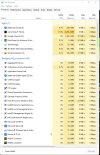
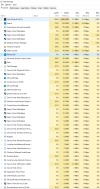
Can you give me a screen shot of yer taskmanager??

Both PROCESSES:
PROCESSES.jpg


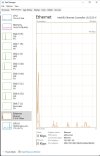
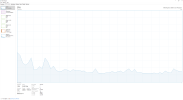
And PERFORMANCE

PERFORMANCE.jpg
 
Thanks for warning me! Didn't have any on them.
Watch out with your IP tho....

DOH!!!!! :D

It's an internal subnet LAN IP, so no biggie.. But yea.. I shoulda practiced what I preached.. heh

Latest COD i have on pc except the warzones is ghosts unfortunately....

Yer numbers look good... I am inclined to think it's a network/internet issue... I dunno if WZ2 allows private matches with bots, but that's where I would lean...

Hardware wise, numbers, temps everything looks good.. By process of elimination I would have to guess 'Net....

We have the grandkids here so I am going to have to bail... I'll check in around 0400 Florida US time to catch any updates...

"Hasta lasagna, don't get any on ya.."
-Emilio Estevez, MISSION IMPOSSIBLE

:D
 
Unfortunately WZ2 does not have a bots match.
Will look into options to test network issues.
ALMOST makes me want to go to console.
PC is way too much fun ;)

Yea I almost went XBOX just for WARZONE... Fortunately, I sobered up real fast.. :D heh

I am so glad to have @AntiCheatAgent94 and @KeyboardDemon as members. They fill a void that I've been looking for: PC gamers. Hopefully we attract more and more people like them here so we can have a variety of PC gamers that can help each other.

This thread reminds me why I host these forums. :)


Well, I bitch and whine and moan alot.. No, really! I do... Honestly! :D

So I figure the least I could do is help people out in between all thing bitchings and whinings about DMZ.. :D
 
Sorry, I'm a bit late to this conversation, however I have read the thread and want to go back to a question that @AntiCheatAgent94 put to you regarding isolating net issues as a cause.

My reasoning is when I built my PC back in June 2020 I built it using my current MSi B450 Tomahawk Max, Ryzen 5 3600, and MSi RX 5700X Gaming GPU, and I was getting the same issues as you are experiencing, all other online games were fine, it only happened with CoD, so I sent back my GPU thinking it was an AMD driver issue and replaced it with an MSi RTX 2070, but this didn't resolve my issue.

I investigated my network, CoD/WZ seems to be particularly sensitive to network issues, and as my network ran through a Powerline connection with a Mesh Wi-Fi node being used to connect my PC over Wi-Fi to my router, I was getting quite a lot of internal latency added to my connection. After moving my Powerline to run directly to my PC and then swapping my Mesh node to where my Powerline was, I started getting more stable frame rates and better CPU & GPU utilisation. This improved immensely when my local area got wired for 100mbps broadband and I upgraded from my 35mbps.

The only way I can think of testing this theory is to try playing WZ 2 in the training mode, I don't know if this is an offline mode, but if it is, it should play fine with no issues and that will point to local network issues as your cause, if it is not, then I am a bit stumped for now.
 
I will test the training mode in a bit.
I do not have such a complex network.
There is a direct connection from the modem to my pc with a Cat5e cable.

Been trying to fix the problem all day, no progression yet...
 
I will test the training mode in a bit.
I do not have such a complex network.
There is a direct connection from the modem to my pc with a Cat5e cable.

Been trying to fix the problem all day, no progression yet...
What type of 'net connection you have???

I think the key to determining the problem here is to be able to play WZ2 in some sort of offline mode where we take the net connection out of the equation...

"We're not going to shoot the hostages, are we??"
"No. We're just going to take them out of the equation.."

-SPEED

:D

If you do have the same problem in offline mode, then.. well.. I dunno.. I guess we'll burn that bridge when we come to it.. :D

I am thinking that if the same issues present itself in offline play, then the next step is a radical one..

A complete wipe of your hard drive and a re-install of Windows.. Once that is accomplished with all the drivers and updates installed, just install BattleNet and WZ2.. WZ2 stand alone is only about 24GB so it shouldn't take too long with a fast 'net connection..

If everything is good then add your various needed apps one by one, always testing your WZ2 after each install..

That should identify the culprit...

Hopefully it won't come to that because that is a bitch of a process... But it's a last ditch effort that usually produces results..
 
I have played DMZ in the shooting range, which makes absolutely no difference at all.
Guess that equals an offline mode.

What exactly do you mean with 'net connection.
I think cable is the answer to your question. (non native english speaker here)

I guess i will need to do it the hard way then....
Will try some things i found online again today and will do a hard reset tomorrow if that doesn't turn out to work.

Thanks again both of you for your help!
 
I have played DMZ in the shooting range, which makes absolutely no difference at all.
Guess that equals an offline mode.

What exactly do you mean with 'net connection.
I think cable is the answer to your question. (non native english speaker here)

I guess i will need to do it the hard way then....

Yea, 'net connection = Internet Connection.. Sorry about that.. :D

So, yea if you have cable internet then all things being equal, it's not your connection.. Insofar as speed and latency goes...

I would think that Shooting Range would be as offline as is possible to be.. So I think we can safely conclude that your internet connection is not the problem..

Time for the Hail Mary FnR. Format & Reinstall...

Will try some things i found online again today and will do a hard reset tomorrow if that doesn't turn out to work.

That should work out real well then.. Once yer re-installed, I have the weekend free to help...

Thanks again both of you for your help!

"One is honored to be of assistance"
-Robin Williams, BICENTENNIAL MAN

:D
 
Bingo!
I found a solution! Now i'm going to identify the problem.
I downloaded and used Razer Cortex and fps is now well above 100. With 1% lows of 15.
I have no clue which of the boost features of this program really is the winner, time to figure that out now.
Will keep you posted.
I am so happy :D
 

Like CODForums!

Advertisements

Back
Top